Saturday, September 12, 2026

How to Fast-Track Software Development with Claude Code and AI

AI is changing the way software developers approach their daily work. It is no longer limited to generating a method, explaining an error, or completing a few lines of code.

AI coding tools can now work with an entire codebase, understand existing implementations, analyze requirements, create implementation plans, modify multiple files, run tests, investigate failures, and help developers move from an idea to a working solution much faster.

Recently, we have been using Claude Enterprise with Claude Code, together with the GSD (Get Shit Done) approach and its associated skills, as part of our software development workflow.

The experience has been interesting because the biggest productivity improvement does not come from simply asking AI to "write code." It comes from giving AI a structured way to understand the problem, work through the implementation, verify the result, and iterate.

In this article, I'll share how we are using this approach, where it can help developers, what we can delegate to AI, and where human involvement is still critical.

What Exactly Is Claude Code?

Claude Code is an AI-powered coding environment that can work directly with a software repository. Instead of copying a small piece of code into a chatbot and asking for a solution, developers can give Claude access to the project and allow it to work with the actual codebase.

Depending on the task and permissions, Claude can:

  • Explore the repositories — in our case, Claude can map and understand multiple codebases.
  • Read and understand existing code
  • Analyze dependencies
  • Search for relevant implementations
  • Understand project structure
  • Plan changes
  • Modify files
  • Create new files
  • Run commands
  • Run tests
  • Investigate test failures
  • Fix implementation issues
  • Review changes
  • Help with Git workflows
  • Generate or update documentation

What Is GSD?

GSD stands for Get Shit Done.

The important idea behind the approach is not simply getting AI to generate code quickly. It is about giving the development task a structured execution process. A large requirement can be broken down into smaller, manageable tasks.

This approach makes AI much more useful for real-world development.

Our Setup — Claude Enterprise, Claude Code & IntelliJ IDEA

For our development work, we have been using Claude Enterprise with Claude Code along with IntelliJ IDEA

  • Claude Enterprisethe organizational environment and controls we use.
  • Claude Code = the coding agent/tool you are actually using for development.
  • GSD + Skills = the structured workflow and capabilities you are applying with Claude Code.
  • One of the useful aspects of Claude Code is that it can work with the actual project rather than requiring us to copy individual classes or code snippets into a chat.

    In our case, we also work with multiple code repositories. Claude can explore the relevant repositories and help us understand how different components are connected and where a particular change may need to be made.

    This is particularly useful when a requirement crosses application boundaries or when we need to understand an existing implementation before making changes.

    For this article, I've used Claude Code with IntelliJ IDEA as my development environment. However, Claude Code isn't limited to IntelliJ IDEA. You can use it with your preferred IDE or directly from the command prompt/terminal, depending on your development workflow and setup.

     How We Use Claude Code

    GSD Approach — How We Structure the Work

    One of the key parts of our workflow is the GSD approach. Instead of immediately asking Claude to implement a requirement, we first allow it to understand the problem and the existing codebase.

    A simplified version of the workflow looks like this:

    Requirement → Understand → Research → Plan → Implement → Test → Review → Refine

    This approach is useful for larger development tasks where simply generating code isn't enough. For example, before implementing a change, Claude can first explore the relevant repositories, identify the existing implementation, look at related tests, and understand how different components interact.

    It can then create a plan for the proposed change. This gives us an opportunity to review the approach before implementation begins. The important part is that the developer remains in the loop.

    We don't simply provide a requirement and accept whatever code is generated. We review the understanding, validate the proposed approach, provide additional context where required, and then allow the implementation to proceed.

    If you're starting a new project

    The typical workflow is:

    /gsd-new-project
           ↓
    /gsd-discuss-phase 1
           ↓
    /gsd-plan-phase 1
           ↓
    /gsd-execute-phase 1
           ↓
    /gsd-verify-work 1 


    But, if you have an existing project, start with /gsd-map-codebase to understand the existing repositories, structure, and relationships before making changes. Then follow the GSD workflow: Discuss → Plan → Execute → Verify.
     /gsd-map-codebase
            ↓
    /gsd-discuss-phase 1
            ↓
    /gsd-plan-phase 1
            ↓
    /gsd-execute-phase 1
            ↓
    /gsd-verify-work 1
            ↓
    /gsd-progress 
     

    Tip: If you want to explore the GSD commands available in your Claude Code environment, use the /help command. It provides information about the available commands and how to use them.

    Skills — How Skills Help Claude 

    Another important part of our setup is skills. Skills provide reusable instructions and context that help Claude follow project-specific conventions, such as coding standards, testing, validation, architecture, and documentation.

    Combined with GSD, they help Claude work more consistently across different types of development tasks, especially in a larger codebase. 

    Skills can cover different types of development work, such as research, planning, implementation, testing, code review, debugging, and documentation. The available skills depend on your project setup.


    The important point is that skills don't remove the need for developer judgement. They help provide structure and consistency, while the developer remains responsible for the final outcome. 

    What Claude Code Can Do 

    Claude Code can help with codebase analysis, planning, implementation, testing, debugging, code review, and documentation.

    For enterprise applications, the key benefit is its ability to understand existing code across multiple repositories and work within the project's context, helping developers make changes faster while maintaining existing architecture and standards. 

    Developer in the Loop — Supervision and Validation

    This is probably the most important part of using AI for software development.

    AI can accelerate development, but the developer should remain in the loop.

    Claude can explore the codebase, create plans, modify code, and run tests. But we still need to review whether it understood the requirement, followed the existing architecture, made the right changes, and covered the necessary tests. A passing test does not always mean the implementation is correct. AI can misunderstand business requirements or make assumptions that don't fit the system.

    Our approach is therefore not:

    Requirement → AI → Final Code

    Instead:

    Requirement → AI → Developer Review → Implementation → Validation → Approval

    The developer remains responsible for the final technical decisions and quality of the software.

    Our Practical Workflow

    • Understand — Start with the requirement and provide the necessary context.
    •  Explore — Let Claude understand the relevant repositories, code, dependencies, and existing implementation.
    •  Plan — Create and review the implementation plan before making changes.
    •  Implement — Claude makes the required changes across the relevant files or repositories.
    •  Test — Run tests, investigate failures, and fix issues.
    •  Review & Refine — Review the Git diff and overall implementation, then refine if needed.

    This gives us an iterative process where AI does the heavy lifting, while the developer stays in control.

    Asking Claude to Create a Mock OrderDto Response


    Real Development Example

    For a real task in our project involving schema tracking and lineage, we used Claude across multiple repositories to understand the existing implementation, plan and implement the changes, and validate the results.

    For the lineage UI, we used React Flow to visualize the relationships between datasets and components.

    This is where GSD + skills + developer supervision helped us move faster while keeping the developer in control.

    The screenshots below are from our actual development environment, with project-specific information removed or anonymized where required.

     Sample Lineage graph1 


    Sample Lineage graph2 


    What Worked Well and What to Watch

    What Worked Well

    Claude Code has been especially useful for understanding code, working across repositories, planning, coding, testing, and debugging.

    The biggest benefit is saving time across the development cycle and getting to the solution faster.

    What to Watch

    AI can hallucinate, misunderstand requirements, introduce bugs, make unwanted changes, over-engineer solutions, or create tests that don't fully validate the requirement. Clear instructions, developer supervision, review, and validation are therefore essential.

    Conclusion

    After using this approach in our day-to-day work, I feel Claude Code + GSD + skills can genuinely save a lot of development time. It doesn't replace the developer. 
     
    It helps with the work around coding — understanding the codebase, exploring repositories, planning, testing, and debugging.
     
    For me, the simple takeaway is:
     
    Let AI do more of the work, but keep the developer in control.

    Monday, September 7, 2026

    Top 5 Interview Questions on BlockingQueue in Java


    1) What is BlockingQueue ? Under which package of JDK its available ?

    Ans- A blocking queue is an interface. BlockingQueue implementations are thread-safe. It helps to handle multi threaded execution , specially its for producer and consumer problem.
    The queue that blocks when you try to dequeue from it and the queue is empty, or if you try to enqueue items to it and the queue is already full. 

    A thread trying to dequeue from an empty queue is blocked until some other thread inserts an item into the queue. 

    There are few implementation for this BlockingQueue as below, all these classes available under java.util.concurrent package.
    • ArrayBlockingQueue
    • SyncronousBlockingQueue
    • PriorityBlockingQueue
    • LinkedBlockingQueue
    • DelayQueue

    2) What is the use of these methods peek(), poll(), take() and remove() ?

    Ans - 
    peek() :- This retrieves, but does not remove, the head of this queue,or returns null if this queue is empty. It doesn't throw any exception.

    poll() :- This retrieves and removes the head of this queue,or returns null if this queue is empty.It doesn't throw any exception.

    take() :- This retrieves and removes the head of this queue, waiting if necessary until an element becomes available. This method waits for certain time , if its interrupted then it throws InterruptedException. 

    remove() :- This retrieves and removes the head of this queue. This method differs from poll() only in that it throws an exception (NoSuchElementException ) if this queue is empty.

    Apart from the above difference take() method is provided by BlockingQueue i.e. java.util.concurrent.BlockingQueue.take(). Where as other methods provided by Queue i.e.  java.util.Queue.poll(), java.util.Queue.peek(), java.util.Queue.remove()


    3) Is this possible to declare BlockingQueue implementation with ZERO/0 size?

    Ans- Yes, if its unbounded implementation. But,if its bounded then we have to provide a capacity. The capacity must be greater than ZERO (i.e. capacity > 0).If we create a BlockingQueue with ZERO capacity then this will throw java.lang.IllegalArgumentException.

    4) Write a program for demonstrating producer & consumer problem using blocking
     queue.

    Ans- Find the answer here.

    5) What is the difference between ArrayBlockingQueue and LinkedBlockingQueue ?

    Ans- ArrayBlockingQueue is a bounded blocking queue backed by an array of objects. LinkedBlockingQueue is an optionally-bounded blocking queue based on linked nodes. 
    Linked queues typically have higher throughput than array-based queues but less predictable performance in most concurrent applications.Linked nodes are dynamically 
    created upon each insertion unless this would bring the queue capacity (Integer.MAX_VALUE). 

    How to Find a List of All Open Files in Linux/UNIX

    How to find list of all open files in Linux/UNIX


    Its really very simple to find the list of open files on UNIX/Linux. As you know Linux/UNIX kernel has many powerful commands which helps a lot.

    For checking the list of all open files on your system, you can use the command

    Command :-

    lsof

    lsof - list open files , this has many command options.Some important options as below :

    -p - for specific PID
    -u - for specific user


    Example :-

    lsof -u manoj


    Output :-

    lsof      9963 manoj  mem       REG                8,1     52120 11276171 /lib/x86_64-linux-gnu/libnss_files-2.15.so
    lsof      9963 manoj  mem       REG                8,1     47680 11276175 /lib/x86_64-linux-gnu/libnss_nis-2.15.so
    lsof      9963 manoj  mem       REG                8,1     97248 11276165 /lib/x86_64-linux-gnu/libnsl-2.15.so
    lsof      9963 manoj  mem       REG                8,1     35680 11276167 /lib/x86_64-linux-gnu/libnss_compat-2.15.so
    lsof      9963 manoj  mem       REG                8,1   7224832  5511486 /usr/lib/locale/locale-archive
    lsof      9963 manoj  mem       REG                8,1   1815224 11276120 /lib/x86_64-linux-gnu/libc-2.15.so
    lsof      9963 manoj  mem       REG                8,1    149280 11276100 /lib/x86_64-linux-gnu/ld-2.15.so
    lsof      9963 manoj  mem       REG                8,1     26258  5769171 /usr/lib/x86_64-linux-gnu/gconv/gconv-modules.cache
    lsof      9963 manoj    0u      CHR              136,0       0t0        3 /dev/pts/0
    lsof      9963 manoj    1u      CHR              136,0       0t0        3 /dev/pts/0
    lsof      9963 manoj    2u      CHR              136,0       0t0        3 /dev/pts/0
    lsof      9963 manoj    3r      DIR                0,3         0        1 /proc
    lsof      9963 manoj    4r      DIR                0,3         0    64363 /proc/9963/fd
    lsof      9963 manoj    5w     FIFO                0,8       0t0    64368 pipe
    lsof      9963 manoj    6r     FIFO                0,8       0t0    64369 pipe
    lsof      9964 manoj  cwd       DIR                8,1      4096  3932162 /home/manoj
    lsof      9964 manoj  rtd       DIR                8,1      4096        2 /
    lsof      9964 manoj  txt       REG                8,1    131312  5505664 /usr/bin/lsof
    lsof      9964 manoj  mem       REG                8,1     52120 11276171 /lib/x86_64-linux-gnu/libnss_files-2.15.so
    lsof      9964 manoj  mem       REG                8,1     47680 11276175 /lib/x86_64-linux-gnu/libnss_nis-2.15.so
    lsof      9964 manoj  mem       REG                8,1     97248 11276165 /lib/x86_64-linux-gnu/libnsl-2.15.so
    lsof      9964 manoj  mem       REG                8,1     35680 11276167 /lib/x86_64-linux-gnu/libnss_compat-2.15.so
    lsof      9964 manoj  mem       REG                8,1   7224832  5511486 /usr/lib/locale/locale-archive
    lsof      9964 manoj  mem       REG                8,1   1815224 11276120 /lib/x86_64-linux-gnu/libc-2.15.so
    lsof      9964 manoj  mem       REG                8,1    149280 11276100 /lib/x86_64-linux-gnu/ld-2.15.so


    Apart from there are many other options you can use to find more powerful lsof command.

    Example 2:-

    manoj@manoj-HP-ProBook-6450b:~$ ps -ef | lsof -p 9987
    COMMAND    PID USER   FD      TYPE DEVICE SIZE/OFF NODE NAME
    kworker/u 9987 root  cwd   unknown                      /proc/9987/cwd (readlink: Permission denied)
    kworker/u 9987 root  rtd   unknown                      /proc/9987/root (readlink: Permission denied)
    kworker/u 9987 root  txt   unknown                      /proc/9987/exe (readlink: Permission denied)
    kworker/u 9987 root NOFD                                /proc/9987/fd (opendir: Permission denied)

    Linux / Unix: Find and Remove Files with One Command

    This is really very easy in Linux/Unix. This is the reason why Linux/Unix is so popular in most of the industries.  


    COMMAND :-

    find - search for files in a directory hierarchy
     

    SYNOPSIS 

    find [-H] [-L] [-P] [-D debugopts] [-Olevel] [path...] [expression]

    SYNTAX

    find <dir-name> <criteria> <action>

    dir-name - The directory which you want to search.
    criteria - This is searching criteria, what you want to search.
    action(if required) - This is command action you want to execute.

    There are many options or expressions you can use to find your relevant files and folders.

    Example :- The below command for finding all files with extension .xml

    dev@jdg-developer-desktop ~ $ find soap_projects/  -name "*.xml"
     

    soap_projects/folk-enabler-no-sec--soapui-project.xml
    soap_projects/aim-localhost-tomcat-soapui-project.xml
    soap_projects/roamenable-service-soapui-project.xml
    soap_projects/search-enabler-soapui-project.xml

    Find all the files , which file name contains "data" and extensions with .txt

    dev@jdg-developer-desktop ~/workspace_test $ find .  -name "*data*.txt"  

    ./test_data_file.txt


    Example for finding and delete all all files with "find" command.


    find . -name "*data*.txt" -exec rm -rf {} \;


    Example for finding and delete all .xml files.


    find / -name "*.xml" -exec rm -f {} \;

    Example for finding and delete all .xml files.

    find /searchdirectory -name "*.xml" -exec rm -f {} \;


    Delete command for all file with find command result :-

    -exec rm -rf {} \;


    Tomcat 7 Catalina.start LifecycleException – Failed to Start Component

    Issue: Catalina.start: org.apache.catalina.LifecycleException: Failed to Start Component

    This is an issue I faced with Tomcat 7 while starting the server. Usually, we start the server from the Eclipse server configuration during the development process.

    The server was not able to start and was not ready to provide the service. It was trying to run for a few seconds but failed with a Windows alert.

     Console logs :-   


    Nov 29, 2014 7:16:46 PM org.apache.catalina.startup.Catalina start
    SEVERE: Catalina.start:
    org.apache.catalina.LifecycleException: Failed to start component [StandardServer[8005]]
    at org.apache.catalina.util.LifecycleBase.start(LifecycleBase.java:154)
    at org.apache.catalina.startup.Catalina.start(Catalina.java:675)
    at sun.reflect.NativeMethodAccessorImpl.invoke0(Native Method)
    at sun.reflect.NativeMethodAccessorImpl.invoke(Unknown Source)
    at sun.reflect.DelegatingMethodAccessorImpl.invoke(Unknown Source)
    at java.lang.reflect.Method.invoke(Unknown Source)
    at org.apache.catalina.startup.Bootstrap.start(Bootstrap.java:322)
    at org.apache.catalina.startup.Bootstrap.main(Bootstrap.java:450)
    Caused by: org.apache.catalina.LifecycleException: Failed to start component [StandardService[Catalina]]
    at org.apache.catalina.util.LifecycleBase.start(LifecycleBase.java:154)
    at org.apache.catalina.core.StandardServer.startInternal(StandardServer.java:732)
    at org.apache.catalina.util.LifecycleBase.start(LifecycleBase.java:150)
    ... 7 more
    Caused by: org.apache.catalina.LifecycleException: Failed to start component [StandardEngine[Catalina]]
    at org.apache.catalina.util.LifecycleBase.start(LifecycleBase.java:154)
    at org.apache.catalina.core.StandardService.startInternal(StandardService.java:443)
    at org.apache.catalina.util.LifecycleBase.start(LifecycleBase.java:150)
    ... 9 more
    Caused by: org.apache.catalina.LifecycleException: A child container failed during start
    at org.apache.catalina.core.ContainerBase.startInternal(ContainerBase.java:1136)
    at org.apache.catalina.core.StandardEngine.startInternal(StandardEngine.java:302)
    at org.apache.catalina.util.LifecycleBase.start(LifecycleBase.java:150)
    ... 11 more

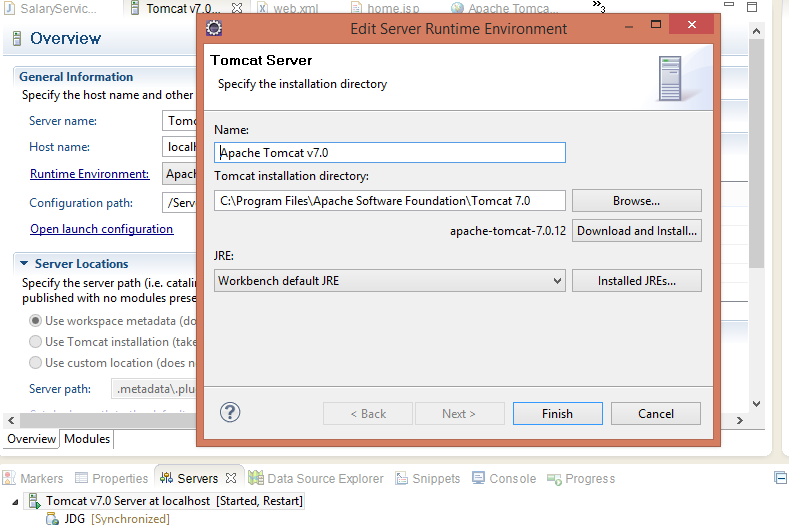
    Caused By - There may be many reason , but I found mismatching of JRE versions. This is likely a JVM class loader issue. If you have multiple JAR files in the same directory with the same class in them , there is no defined order in which the JAR files will be searched. My installed JVM was version JDK 6 but my tomcat configuration was JDK 7.Check your server runtime configuration on Eclipse for JDK version. 


    Also I did the cleanup for the server setting in Eclipse.For cleanup , right click on server configuration and click on clean.Now it works for me.


    5 Common Java Interview Questions About Objects and Object Class

    5 Common Java Interview Questions About Objects and Object Class

    These are some common questions asked in Java/J2EE interviews. These questions are based on Java objects and their behavior.

    Q.1. How can you define an object? How is it related to the real world and how does it behave? With Example.

    Ans: This question is often asked in Java interviews for candidates with 1-8 years of experience. As we know, an object is a real-world entity. It has three basic properties i.e. State, Behavior and Identity. Simply we can say that a class is a blueprint for creating objects, and an object is an instance of a class. Anything around you can be represented as an object. But yes, it has the above three properties by which we can define an object.

    State: what the object has. Dog has a name, age, color, etc. It is implemented by variables in Java.

    Behavior: what the object does. Dog can bark, bite, run, etc. It is implemented by methods in Java.

    Identity: what makes the object unique. Identity is what makes one object distinguishable from another object. It does not necessarily mean that every object must have a unique id variable. Different objects can also have the same hash code.

    Example - Suppose there are many dogs. But, you can't say that is an object. You need to take one dog which has name - Dick, age - 8, color - white and it can be distinguished from other objects. And now we can say Dick is a dog object. And this Dick can bark, bite and run. These are the behaviors that the object can do, and they are implemented by methods.

    Q.2. How many constructors & methods are in Object class?

    Ans: The Object class has one constructor and several methods. The exact list depends on the Java version. It is available inside the java.lang package.

    Constructor :-

    public Object()
    

    Methods :-

    clone() - This creates and returns a copy of the object.
    
    equals() - This is used to compare whether some other object is equal to this object or not.
    
    toString() - Converts and returns a string representation of the object.
    
    finalize() - An old mechanism associated with garbage collection. It is deprecated and should not be relied upon for resource cleanup.
    
    getClass() - This returns the runtime class of this object.
    
    hashCode() - Returns a hash code for this object. The hash code is not guaranteed to be unique.
    
    notify() - Wakes up a single thread that is waiting on this object's monitor.
    
    notifyAll() - Wakes up all threads that are waiting on this object's monitor.
    
    wait() - This makes the current thread wait until another thread notifies it.
    

    Q.3. Why are wait() and notify() methods inside Object class instead of Thread class?

    Ans: This is a FAQ for any Java interview. The wait() and notify() methods are used in a multi-threaded environment. These methods are inside the Object class because we are doing the monitoring work over an object. Whenever we are calling these methods, we are calling them on an object, not on a thread.

    The wait() and notify() methods are used for thread coordination through an object's monitor.

    Q.4. How many ways can we create an object in Java?

    Ans: There are basic four ways for creating an object in Java as below:-

    By using new keyword -

    Object obj = new Object();

    By using Class.forName() -

    Dog dogObj = (Dog) Class.forName("jdeveloperguide.lab.Dog")
            .getDeclaredConstructor()
            .newInstance();
    

    By using deserialization -

    ObjectInputStream inStream = new ObjectInputStream(anInputStream);
    Dog dogObject = (Dog) inStream.readObject();
    

    By using clone() -

    Dog dogObj = new Dog();
    Dog dogObj2 = dogObj.clone();
    

    The class must implement the Cloneable interface and provide appropriate cloning support.

    Q.5. How does JVM allocate objects in memory? What is heap and stack memory?

    Ans: Normally, objects are allocated on heap memory. Heap memory is a dynamic memory area used for objects during runtime.

    Each thread has its own stack for method calls and local variables. Objects are generally allocated on the heap, while references and local variables may be stored in the stack depending on the JVM implementation and optimization.

    Every thread creates a stack (call stack), and when the thread completes, its stack is no longer needed and its memory can be reclaimed.

    Stack operations are generally simpler and faster than heap allocation, but the actual behavior depends on the JVM and its optimizations.

    You can share your interview experience with asked questions and answers for publishing on this blog.

    How to Install SQL*Plus Client on Linux

    Its really very simple steps to do this, and very crazy while dependency for compatibility with OS (x32 bit or x64 bit).


    I have done for x64 bit Linux UBUNTU. Generally Oracle provides .rpm packages , and you need to download those packages into  your machine.

    Download here.

    Assuming that you have already installed Oracle Database , else you are connecting some remote database. Because, this post only show the sqlplus installation to connect existing database.

    Downloaded files :-

    oracle-instantclient12.1-basic-12.1.0.2.0-1.x86_64.rpm
    oracle-instantclient12.1-devel-12.1.0.2.0-1.x86_64.rpm
    oracle-instantclient12.1-sqlplus-12.1.0.1.0-1.x86_64.rpm

    Copy these files to your preferred location. I have  used below location.

    /usr/java


    Now time for convert these .rpm packages into Debian specific package and install on your Ubuntu. Use alien command to convert.


    Follow the below steps and install one-by-one.

    First install the sqlplus :-

    dev@javadevelopersguide-developer-desktop /usr/java $ sudo alien -i oracle-instantclient12.1-sqlplus-12.1.0.1.0-1.x86_64.rpm

    [sudo] password for dev:

    dpkg --no-force-overwrite -i oracle-instantclient12.1-sqlplus_12.1.0.1.0-2_amd64.deb

    Selecting previously unselected package oracle-instantclient12.1-sqlplus.

    (Reading database ... 226951 files and directories currently installed.)

    Unpacking oracle-instantclient12.1-sqlplus (from oracle-instantclient12.1-sqlplus_12.1.0.1.0-2_amd64.deb) ...

    Setting up oracle-instantclient12.1-sqlplus (12.1.0.1.0-2) ...

    Second install the basic (packages) :-

    dev@javadevelopersguide-developer-desktop /usr/java $ sudo alien -i oracle-instantclient12.1-basic-12.1.0.2.0-1.x86_64.rpm
    dpkg --no-force-overwrite -i oracle-instantclient12.1-basic_12.1.0.2.0-2_amd64.deb

    Selecting previously un-selected package oracle-instantclient12.1-basic.

    (Reading database ... 226963 files and directories currently installed.)

    Unpacking oracle-instantclient12.1-basic (from oracle-instantclient12.1-basic_12.1.0.2.0-2_amd64.deb) ...

    Setting up oracle-instantclient12.1-basic (12.1.0.2.0-2) ...

    Processing triggers for libc-bin ...

    ldconfig deferred processing now taking place
     

    Third install the devel :-

    dev@javadevelopersguide-developer-desktop /usr/java $ sudo alien -i oracle-instantclient12.1-devel-12.1.0.2.0-1.x86_64.rpm

    dpkg --no-force-overwrite -i oracle-instantclient12.1-devel_12.1.0.2.0-2_amd64.deb

    Selecting previously unselected package oracle-instantclient12.1-devel.

    (Reading database ... 226981 files and directories currently installed.)

    Unpacking oracle-instantclient12.1-devel (from oracle-instantclient12.1-devel_12.1.0.2.0-2_amd64.deb) ...

    Setting up oracle-instantclient12.1-devel (12.1.0.2.0-2) ...


    Once these installation complete, you can start sqlplus using below command. Either you can use your specific user/password with correct server address.


    dev@javadevelopersguide-developer-desktop /usr/java $ sqlplus / as sysdba

    Good to go if no error, else follow with fixing below !! Good luck.

    Note - You may face the below library missing issue while executing sqlplus command. Error below :-


    dev@javadevelopersguide-developer-desktop /usr/java $ sqlplus / as sysdba

    sqlplus: error while loading shared libraries: libsqlplus.so: cannot open shared object file: No such file or directory


    Now this issue saying the lib is not loading, the sqlplus is complaining about the missing library.


    So you need to edit the oracle.conf and provide the correct lib path (i.e : /usr/lib/oracle/12.1/client64/lib).Add this path into oracle.conf file.


    dev@javadevelopersguide-developer-desktop /usr/java $ sudo vi /etc/ld.so.conf.d/oracle.conf

    /usr/lib/oracle/12.1/client64/lib


    Now, you should be able to connect to your preferred Database. I have connected to our remote server as below :

    dev@javadevelopersguide-developer-desktop /usr/java $ sqlplus my_user/my_password@z2customdb01.ztest/z2custom.zenv.mycompanyadd.com.in
    SQL*Plus: Release 12.1.0.1.0 Production on Wed Dec 23 16:30:02 2015
    Copyright (c) 1982, 2013, Oracle. All rights reserved.
    Last Successful login time: Wed Dec 23 2015 16:18:22 +11:00

    Connected to:

    Oracle Database 12c Enterprise Edition Release 12.1.0.2.0 - 64bit Production

    With the Partitioning option
    SQL>

    SQL>


    Birla Soft Interview Question and Answers for Java 2- 4 year experience

    The below questions asked by Birla Soft for Java/J2EE. I tried to give the best answer , hope it will help you out to crack the interview.

    Q. Tell me about your self?
     Ans:  Give your brief introduction.

    Q. Is Java Pass by Reference or Pass by Value?
    Ans : Its always pass by value .

    Q. What is the difference between an Interface and an Abstract class?
    Ans : Both are looks similar. But, the basic difference is abstract class can contain abstract and non abstract methods, where interface only contains abstract method (without method body). You can declare fields that are not static and final, and define public, protected, and private concrete methods in abstract class. But, in Interface all members are public, static and final , all methods are public.

    Q. What is the purpose of garbage collection in Java, and when is it used?
    Ans : Garbage collection is a special feature in java language. It helps developer to save time and extra mental tension for handling object allocation in memory. It automatically clean the unused object from memory which helps to allocate space at runtime. When there is no reference to an object found, it will clean that object from memory . You can run the garbage collection explicitly by using System.gc() .

    Q. What is Marker interface? How is it used in Java?
    Ans : Marker interface is an interface which help us to notify few information to JVM/Compiler. The marker interface does not have any body, it’s a empty interface. Ex. Cloneable, Serialization, etc.            

    Q. Can you give few examples of final classes defined in Java API?
    Ans: String, Integer ,Float ,etc. Basically all wrapper classed are final.

    Q. What is the importance of init() method in Servlet?
    Ans:  init() method is one of the life cycle method of servlet. This method runs once in total life. After servlet instance created and before it handles request the init() method will work. Its basically used for initializing values at the time of application startup.

    Q. How to improve Servlet Performance ?
    Ans: You need to do few tuning for this achievement. Few points below :-

    1.     Use init() method for all expensive operation during initialization (may be static data or cached data ).
    2.     Always avoid auto loading of servlet.
    3.     Avoid SingleThreadModel.
    4.     Use and control HttpSession properly.

    Q. How can a Servlet refresh automatically if some new data has entered the database?
    Ans :  Basically it depends on the scenario , how you can handle. You need  handle this in DAO layer, when doing insert operation you can call an utility method which will load the context ServletContextListener. Because, servlets are basically used for handling request and give the response.

    Q. How does JSP handle run-time exceptions?
    Ans: You can use isErrorPage=”true” in page attribute.

    Q. What is an EJB Context?
    Ans: The EJBContext interface provides an instance with access to the container-provided runtime context of an enterprise bean instance.