Showing posts with label aws. Show all posts

Thursday, September 3, 2026

How to Get an AWS Access Key ID and Secret Access Key for an IAM User

AWS Access Key ID and Secret Access Key are used when you need to access AWS services programmatically. For example, you can use them with the AWS CLI to access services such as S3, EC2, and other AWS services.

In this article, we will see how to get the Access Key ID and Secret Access Key for an IAM user from the AWS Management Console.

Note: Keep your Secret Access Key secure. Do not share it with anyone or commit it to your source code.

  • Goto to Identity and Access Management (IAM)
  • Click on Users (Left side of the page under Access Management)
  • Then click on your user name from the user list. You will be seeing the below screen.


  • Click on "Security and credentials" and click on "Create access key" to creating the new access key and download the .csv file as per the below screenshot. 


  • Now you can see your access key and secret access key looks like as below.
    • Access key ID - AAKIASPHRAQWAKKLAR87
      Secret access key - sZ+7JJKd++UjfjfuueFJV9pXXVDOv48xiBbm

AWS CloudFront Access Denied: CreateInvalidation Operation

If you are getting Access Denied when calling the CreateInvalidation operation from AWS CLI, it must be a permission issue for that user.

In this post, I am using the Jenkins pipeline to build and push the artifacts into S3. I am using CloudFront as the Content Delivery Network (CDN) and hosting my website in Route 53.

When I am trying to invalidate the CloudFront Distribution cache from the CLI, I am getting the error below. I thought adding a screenshot would provide more visibility, so I have added it below.

Error Log:

A client error (AccessDenied) occurred when calling the CreateInvalidation operation: User: arn:aws:iam::xxxxxxxxxxx:user/yyyy is not authorized to perform: cloudfront:

The AWS CLI commands I am using are:

aws configure set preview.cloudfront true

aws cloudfront create-invalidation --distribution-id UJH89JKKMOVY340 --paths "/*"


Resolution:

Add the CreateInvalidation permission to that user. Below are the steps to add the permission.

  • Go to Identity and Access Management (IAM).

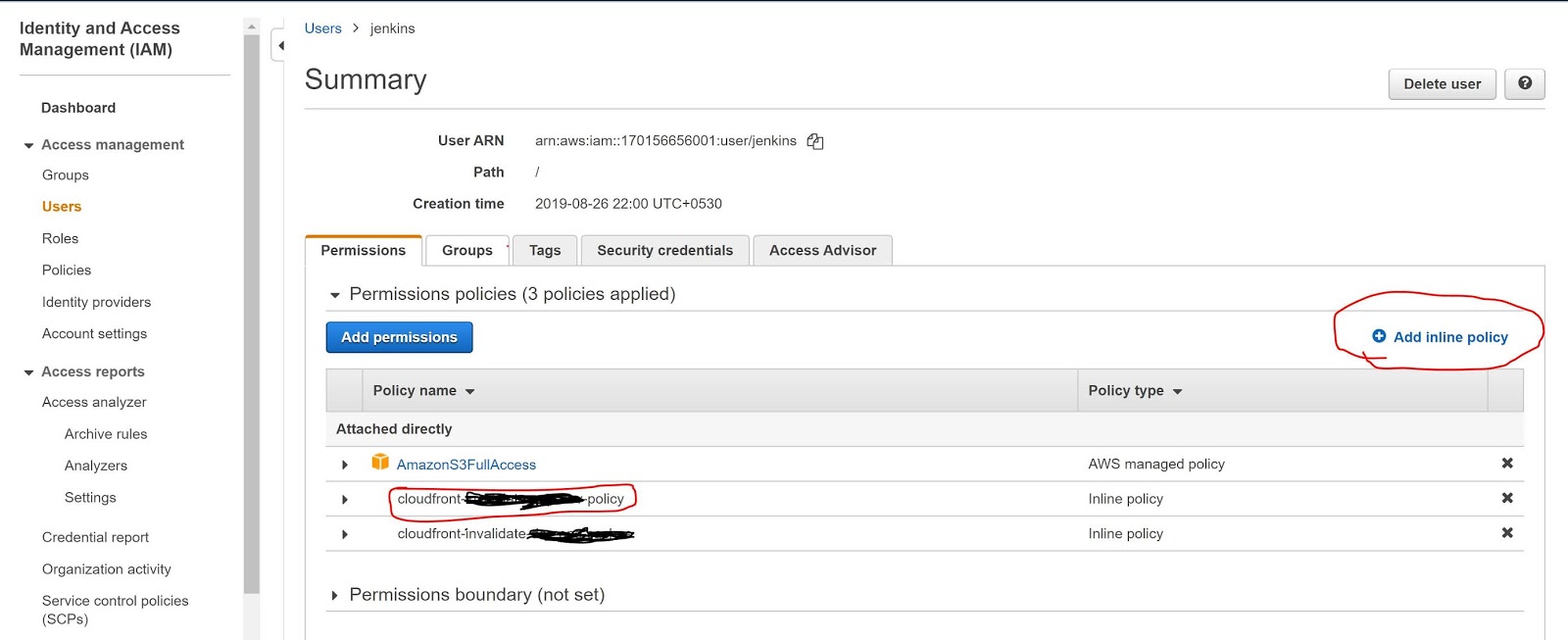
  • Go to Users and find your username. In my case, it is Jenkins.

  • Then add a new Inline policy, as shown in the screenshot below.


  • Now add the below policy into the JSON policy editor. Below the screenshot.

Policy JSON:-


{
    "Version": "2012-10-17",
    "Statement": [
        {
            "Sid": "VisualEditoro",
            "Effect": "Allow",
            "Action": "cloudfront:CreateInvalidation",
            "Resource": "arn:aws:cloudfront::17088938460999:distribution/UJH89JKKMOVY340"
        }
    ]
}


Sample Screenshot:-


Now, it's working fine. I can see the Jenkins logs below.

Jenkins Success Log:-

; perhaps you meant to use ‘PATH+EXTRA=/something/bin’?
+ aws configure set preview.cloudfront true
[Pipeline] sh
Warning: JENKINS-41339 probably bogus PATH=/var/lib/jenkins/tools/jenkins.plugins.nodejs.tools.NodeJSInstallation/node-v10.16.3-linux-x64/bin:/var/lib/jenkins/tools/hudson.model.JDK/JDK8-152/bin:$PATH:/usr/local/bin:$MAVEN_HOME/bin:/usr/local/bin:/var/lib/jenkins/tools/hudson.tasks.Maven_MavenInstallation/mvn/bin:/usr/sbin:/usr/bin:/sbin:/bin; perhaps you meant to use ‘PATH+EXTRA=/something/bin’?
+ aws cloudfront create-invalidation --distribution-id UJH89JKKMOVY340 --paths '/*'
{
    "Invalidation": {
        "Status": "InProgress", 
        "InvalidationBatch": {
            "Paths": {
                "Items": [
                    "/*"
                ], 
                "Quantity": 1
            }, 
            "CallerReference": "cli-1588239578-85708"
        }, 
        "Id": "I3HILN71CKWOV4", 
        "CreateTime": "2020-04-30T09:39:38.919Z"
    }, 
    "Location": "https://cloudfront.amazonaws.com/2019-03-26/distribution/UJH89JKKMOVY340/invalidation/I3HILN71CKWOV4"
}


Hope this will help you. 

Thursday, June 13, 2019

AWS Lambda AccessDeniedException While Calling getIntents

I am getting the below issue (AccessDeniedException ) while calling getIntents in lambda function with NodeJs. Below screenshot shows my lambda function call.


AccessDeniedException Logs 


2019-06-13T05:11:41.415Z 2b50a8fb-81bc-4f35-b024-d8c4a7864c74 INFO { AccessDeniedException: User: arn:aws:sts::156576774796:assumed-role/fulfilClaimProcessRole/fulfilClaimProcess is not authorized to perform: lex:GetIntents on resource: arn:aws:lex:us-east-1:156576774796:intent:*at Object.extractError (/var/runtime/node_modules/aws-sdk/lib/protocol/json.js:51:27)at Request.extractError (/var/runtime/node_modules/aws-sdk/lib/protocol/rest_json.js:55:8)at Request.callListeners (/var/runtime/node_modules/aws-sdk/lib/sequential_executor.js:106:20)at Request.emit (/var/runtime/node_modules/aws-sdk/lib/sequential_executor.js:78:10)at Request.emit (/var/runtime/node_modules/aws-sdk/lib/request.js:683:14)at Request.transition (/var/runtime/node_modules/aws-sdk/lib/request.js:22:10)at AcceptorStateMachine.runTo (/var/runtime/node_modules/aws-sdk/lib/state_machine.js:14:12)at /var/runtime/node_modules/aws-sdk/lib/state_machine.js:26:10at Request.<anonymous> (/var/runtime/node_modules/aws-sdk/lib/request.js:38:9)at Request.<anonymous> (/var/runtime/node_modules/aws-sdk/lib/request.js:685:12)message:'User: arn:aws:sts::156576774796:assumed-role/fulfilClaimProcessRole/fulfilClaimProcess is not authorized to perform: lex:GetIntents on resource: arn:aws:lex:us-east-1:156576774796:intent:*',code: 'AccessDeniedException',time: 2019-06-13T05:11:41.355Z,requestId: 'baaca585-8d99-11e9-a134-070d28c2c0ab',statusCode: 403,retryable: false,retryDelay: 64.04832064780818 } 'AccessDeniedException: User: arn:aws:sts::156576774796:assumed-role/fulfilClaimProcessRole/fulfilClaimProcess is not authorized to perform: lex:GetIntents on resource: arn:aws:lex:us-east-1:156576774796:intent:*\n at Object.extractError (/var/runtime/node_modules/aws-sdk/lib/protocol/json.js:51:27)\n at Request.extractError (/var/runtime/node_modules/aws-sdk/lib/protocol/rest_json.js:55:8)\n at Request.callListeners (/var/runtime/node_modules/aws-sdk/lib/sequential_executor.js:106:20)\n at Request.emit (/var/runtime/node_modules/aws-sdk/lib/sequential_executor.js:78:10)\n at Request.emit (/var/runtime/node_modules/aws-sdk/lib/request.js:683:14)\n at Request.transition (/var/runtime/node_modules/aws-sdk/lib/request.js:22:10)\n at AcceptorStateMachine.runTo (/var/runtime/node_modules/aws-sdk/lib/state_machine.js:14:12)\n at /var/runtime/node_modules/aws-sdk/lib/state_machine.js:26:10\n at Request.<anonymous> (/var/runtime/node_modules/aws-sdk/lib/request.js:38:9)\n at Request.<anonymous> (/var/runtime/node_modules/aws-sdk/lib/request.js:685:12)'

Solutions :- It seems there is no access/privileges to access that resource. Now , I am going to give "AmazonLexFullAccess" to my lambda function. You need to attach the policy to your lambda function. Follow the below steps to attach the new permission.

  • Goto ->  Security, Identity, & Compliance => IAM (Identity and Access Management) 
  • Select Roles => Select your Lambda function role(Which is you would have created during function creation?) 
  • Now click on Attach policy 
  • Find AmazonLexFullAccess and click on attach.

Once you provide the AmazonLexFullAccess to your lambda function role , you will be able to call your lex:intents call. Its working for me. See the below response I got from the lex:intents call. I got my all intents I have created.


{
    "intents": [
        {
            "name": "AutoLoanDepartment",
            "description": null,
            "lastUpdatedDate": "2019-06-04T10:03:16.995Z",
            "createdDate": "2019-06-04T05:16:50.430Z",
            "version": "$LATEST"
        },
        {
            "name": "BookCar",
            "description": "Intent to book a car on StayBooker",
            "lastUpdatedDate": "2019-06-04T03:23:05.817Z",
            "createdDate": "2019-06-04T03:19:44.041Z",
            "version": "$LATEST"
        },
        {
            "name": "BookHotel",
            "description": "Intent to book a hotel on StayBooker",
            "lastUpdatedDate": "2019-06-04T03:19:43.241Z",
            "createdDate": "2019-06-04T03:19:43.241Z",
            "version": "$LATEST"
        },
        {
            "name": "ClaimDepartment",
            "description": null,
            "lastUpdatedDate": "2019-06-05T10:19:51.705Z",
            "createdDate": "2019-06-05T10:19:51.705Z",
            "version": "$LATEST"
        },
        {
            "name": "ClaimProcess",
            "description": null,
            "lastUpdatedDate": "2019-06-13T04:43:06.699Z",
            "createdDate": "2019-06-06T03:35:33.460Z",
            "version": "$LATEST"
        },
        {
            "name": "GreetingMSG",
            "description": null,
            "lastUpdatedDate": "2019-06-11T08:02:33.055Z",
            "createdDate": "2019-06-06T03:35:06.013Z",
            "version": "$LATEST"
        },
        {
            "name": "LoanDepartment",
            "description": null,
            "lastUpdatedDate": "2019-06-04T05:14:16.304Z",
            "createdDate": "2019-06-04T03:36:52.751Z",
            "version": "$LATEST"
        },
        {
            "name": "PersonalLoanDept",
            "description": null,
            "lastUpdatedDate": "2019-06-04T03:32:46.542Z",
            "createdDate": "2019-06-04T03:32:46.542Z",
            "version": "$LATEST"
        },
        {
            "name": "PolicyProcess",
            "description": null,
            "lastUpdatedDate": "2019-06-06T06:01:46.064Z",
            "createdDate": "2019-06-06T06:01:46.064Z",
            "version": "$LATEST"
        },
        {
            "name": "RenewPolicy",
            "description": null,
            "lastUpdatedDate": "2019-06-07T07:05:13.123Z",
            "createdDate": "2019-06-06T10:29:21.371Z",
            "version": "$LATEST"
        }
    ],
    "nextToken": null
}


Hope this will help you. 

AWS Lex: Version Mismatch Issue and Simple Fix

This is very common problem with Lex when you are working with a version which is not matching with the published one. I have fixed this with a simple refresh the page. Either, you can reload your bot again. I will keep posting more on AWS Lex, lambda, cognito, ec2,etc in my upcoming posts, so stay tune here  :)