Showing posts with label Troubleshooting. Show all posts

Monday, September 7, 2026

Tomcat 7 Catalina.start LifecycleException – Failed to Start Component

Issue: Catalina.start: org.apache.catalina.LifecycleException: Failed to Start Component

This is an issue I faced with Tomcat 7 while starting the server. Usually, we start the server from the Eclipse server configuration during the development process.

The server was not able to start and was not ready to provide the service. It was trying to run for a few seconds but failed with a Windows alert.

 Console logs :-   


Nov 29, 2014 7:16:46 PM org.apache.catalina.startup.Catalina start
SEVERE: Catalina.start:
org.apache.catalina.LifecycleException: Failed to start component [StandardServer[8005]]
at org.apache.catalina.util.LifecycleBase.start(LifecycleBase.java:154)
at org.apache.catalina.startup.Catalina.start(Catalina.java:675)
at sun.reflect.NativeMethodAccessorImpl.invoke0(Native Method)
at sun.reflect.NativeMethodAccessorImpl.invoke(Unknown Source)
at sun.reflect.DelegatingMethodAccessorImpl.invoke(Unknown Source)
at java.lang.reflect.Method.invoke(Unknown Source)
at org.apache.catalina.startup.Bootstrap.start(Bootstrap.java:322)
at org.apache.catalina.startup.Bootstrap.main(Bootstrap.java:450)
Caused by: org.apache.catalina.LifecycleException: Failed to start component [StandardService[Catalina]]
at org.apache.catalina.util.LifecycleBase.start(LifecycleBase.java:154)
at org.apache.catalina.core.StandardServer.startInternal(StandardServer.java:732)
at org.apache.catalina.util.LifecycleBase.start(LifecycleBase.java:150)
... 7 more
Caused by: org.apache.catalina.LifecycleException: Failed to start component [StandardEngine[Catalina]]
at org.apache.catalina.util.LifecycleBase.start(LifecycleBase.java:154)
at org.apache.catalina.core.StandardService.startInternal(StandardService.java:443)
at org.apache.catalina.util.LifecycleBase.start(LifecycleBase.java:150)
... 9 more
Caused by: org.apache.catalina.LifecycleException: A child container failed during start
at org.apache.catalina.core.ContainerBase.startInternal(ContainerBase.java:1136)
at org.apache.catalina.core.StandardEngine.startInternal(StandardEngine.java:302)
at org.apache.catalina.util.LifecycleBase.start(LifecycleBase.java:150)
... 11 more

Caused By - There may be many reason , but I found mismatching of JRE versions. This is likely a JVM class loader issue. If you have multiple JAR files in the same directory with the same class in them , there is no defined order in which the JAR files will be searched. My installed JVM was version JDK 6 but my tomcat configuration was JDK 7.Check your server runtime configuration on Eclipse for JDK version. 
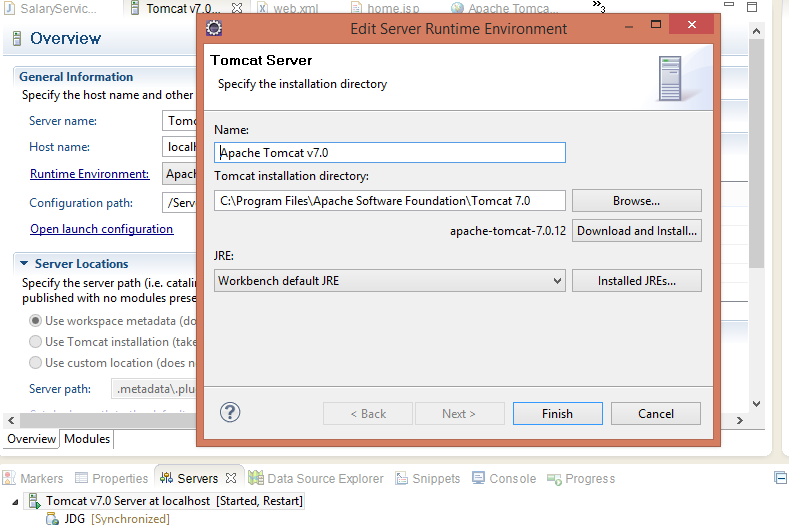


Also I did the cleanup for the server setting in Eclipse.For cleanup , right click on server configuration and click on clean.Now it works for me.


WebLogic Error: Unable to Get File Lock, Will Retry

Unable to get file lock, will retry ...

This is a common issue for web logic user/developer. Developers are always facing this issue with file lock.Something went wrong.

Weblogic Console Error Log -

<31/01/2017 2:25:12 PM EST> <Info> <Security> <BEA-090906> <Changing the default Random Number Generator in RSA CryptoJ from ECDRBG to FIPS186PRNG. To disable this change, specify -Dweblogic.security.allowCryptoJDefaultPRNG=true>
<31/01/2017 2:25:12 PM EST> <Info> <WebLogicServer> <BEA-000377> <Starting WebLogic Server with Java HotSpot(TM) Client VM Version 17.0-b17 from Sun Microsystems Inc.>

<31/01/2017 2:25:23 PM EST> <Info> <Management> <BEA-141281> <unable to get file lock, will retry ...>

<31/01/2017 2:25:33 PM EST> <Info> <Management> <BEA-141281> <unable to get file lock, will retry ...>
<31/01/2017 2:25:43 PM EST> <Info> <Management> <BEA-141281> <unable to get file lock, will retry ...>

<31/01/2017 2:25:53 PM EST> <Info> <Management> <BEA-141281> <unable to get file lock, will retry ...>

<31/01/2017 2:26:03 PM EST> <Info> <Management> <BEA-141281> <unable to get file lock, will retry ...>

<31/01/2017 2:26:13 PM EST> <Info> <Management> <BEA-141281> <unable to get file lock, will retry ...>

<31/01/2017 2:26:23 PM EST> <Info> <Management> <BEA-141281> <unable to get file lock, will retry ...>

<31/01/2017 2:26:33 PM EST> <Info> <Management> <BEA-141281> <unable to get file lock, will retry ...>

<31/01/2017 2:26:43 PM EST> <Info> <Management> <BEA-141281> <unable to get file lock, will retry ...>

<31/01/2017 2:26:53 PM EST> <Info> <Management> <BEA-141281> <unable to get file lock, will retry ...>

<31/01/2017 2:27:03 PM EST> <Info> <Management> <BEA-141281> <unable to get file lock, will retry ...>

<31/01/2017 2:27:13 PM EST> <Info> <Management> <BEA-141281> <unable to get file lock, will retry ...>

<31/01/2017 2:27:23 PM EST> <Info> <Management> <BEA-141281> <unable to get file lock, will retry ...>

<31/01/2017 2:27:33 PM EST> <Info> <Management> <BEA-141281> <unable to get file lock, will retry ...>

<31/01/2017 2:27:43 PM EST> <Info> <Management> <BEA-141281> <unable to get file lock, will retry ...>

<31/01/2017 2:27:53 PM EST> <Info> <Management> <BEA-141281> <unable to get file lock, will retry ...>

<31/01/2017 2:28:03 PM EST> <Info> <Management> <BEA-141281> <unable to get file lock, will retry ...>

<31/01/2017 2:28:13 PM EST> <Info> <Management> <BEA-141281> <unable to get file lock, will retry ...>

<31/01/2017 2:28:18 PM EST> <Critical> <WebLogicServer> <BEA-000362> <Server failed. Reason:

There are 1 nested errors:

weblogic.management.ManagementException: Unable to obtain lock on /usr/java/Oracle/Middleware/user_projects/domains/base_domain/servers/AdminServer/tmp/AdminServer.lok. Server may already be running
    at weblogic.management.internal.ServerLocks.getServerLock(ServerLocks.java:206)
    at weblogic.management.internal.ServerLocks.getServerLock(ServerLocks.java:67)
    at weblogic.management.internal.DomainDirectoryService.start(DomainDirectoryService.java:74)
    at weblogic.t3.srvr.ServerServicesManager.startService(ServerServicesManager.java:461)
    at weblogic.t3.srvr.ServerServicesManager.startInStandbyState(ServerServicesManager.java:166)
    at weblogic.t3.srvr.T3Srvr.initializeStandby(T3Srvr.java:881)
    at weblogic.t3.srvr.T3Srvr.startup(T3Srvr.java:568)
    at weblogic.t3.srvr.T3Srvr.run(T3Srvr.java:469)
    at weblogic.Server.main(Server.java:71)

>
<31/01/2017 2:28:18 PM EST> <Notice> <WebLogicServer> <BEA-000365> <Server state changed to FAILED>
<31/01/2017 2:28:18 PM EST> <Error> <WebLogicServer> <BEA-000383> <A critical service failed. The server will shut itself down>
<31/01/2017 2:28:18 PM EST> <Notice> <WebLogicServer> <BEA-000365> <Server state changed to FORCE_SHUTTING_DOWN>


Solutions :-

You can fix the by simple one step. Just delete the AdminServer.lok file from  your domain.

I have deleted below , check the below commands ..

Go to the /tmp directory inside your weblogic domain.

cd  /usr/java/Oracle/Middleware/user_projects/domains/base_domain/servers/AdminServer/tmp

Checking the existing files inside /tmp directory.


dev@jdg-desktop /usr/java/Oracle/Middleware/user_projects/domains/base_domain/servers/AdminServer/tmp $ ls
AdminServer.lok  WebServiceUtils.ser  _WL_internal  _WL_user
Now delete the AdminServer.lok file from this /tmp directory. 
dev@jdg-desktop /usr/java/Oracle/Middleware/user_projects/domains/base_domain/servers/AdminServer/tmp $ rm -rf AdminServer.lok

How to Find the Amount of RAM in a Linux Machine

How to find the number of RAM in Linux Machine (i.e. Mint OS). Its working for Mint OS and tested. 
sudo lshw -short


Example -


dev@developer-desktop $ sudo lshw -short
[sudo] password for dev:

H/W path Device Class Description

=========================================================
system 4518B8M (To be filled by O.E.M.)
/0 bus Motherboard
/0/0 memory 64KiB BIOS
/0/4 processor Intel(R) Core(TM) i5-2400 CPU @ 3.10GHz
/0/4/5 memory 128KiB L1 cache
/0/4/6 memory 1MiB L2 cache
/0/4/7 memory 6MiB L3 cache
/0/1b memory 4GiB System Memory
/0/1b/0 memory DIMMProject-Id-Version: lshwReport-Msgid-Bugs-To: FULL NAME <EMAIL@ADDRESS>POT-Creation-Date: 2009-10-08 14:02+0200PO-Revision-Date: 2012-02-02 13:04+0000Last-T
/0/1b/1 memory 2GiB DIMM DDR3 Synchronous 1333 MHz (0.8 ns)
/0/1b/2 memory DIMMProject-Id-Version: lshwReport-Msgid-Bugs-To: FULL NAME <EMAIL@ADDRESS>POT-Creation-Date: 2009-10-08 14:02+0200PO-Revision-Date: 2012-02-02 13:04+0000Last-T
/0/1b/3 memory 2GiB DIMM DDR3 Synchronous 1333 MHz (0.8 ns)
/0/100 bridge 2nd Generation Core Processor Family DRAM Controller
/0/100/2 display 2nd Generation Core Processor Family Integrated Graphics Controller
/0/100/16 communication 6 Series/C200 Series Chipset Family MEI Controller #1
/0/100/16.3 communication 6 Series/C200 Series Chipset Family KT Controller
/0/100/19 eth0 network 82579LM Gigabit Network Connection
/0/100/1a bus 6 Series/C200 Series Chipset Family USB Enhanced Host Controller #2
/0/100/1b multimedia 6 Series/C200 Series Chipset Family High Definition Audio Controller
/0/100/1d bus 6 Series/C200 Series Chipset Family USB Enhanced Host Controller #1
/0/100/1e bridge 82801 PCI Bridge
/0/100/1f bridge Q67 Express Chipset Family LPC Controller
/0/100/1f.2 scsi0 storage 6 Series/C200 Series Chipset Family SATA AHCI Controller
/0/100/1f.2/0 /dev/sda disk 250GB WDC WD2500AAKX-0
/0/100/1f.2/0/1 /dev/sda1 volume 96GiB EXT4 volume
/0/100/1f.2/0/2 /dev/sda2 volume 52GiB Extended partition
/0/100/1f.2/0/2/5 /dev/sda5 volume 51GiB Linux filesystem partition
/0/100/1f.2/0/2/6 /dev/sda6 volume 1469MiB Linux filesystem partition
/0/100/1f.2/1 /dev/cdrom disk DVD RW AD-7250H
/0/100/1f.3 bus 6 Series/C200 Series Chipset Family SMBus Controller
/1 power To Be Filled By O.E.M.
/2 power To Be Filled By O.E.M.


Above I have highlighted with red color , it shows 2 slots is reserved for 2 RAM. Hope it will help you.

How to Generate a Thread Dump in Java (Quick Guide)

A Thread Dump helps you track the exact activity of every running thread in your Java application at a specific point in time. It is essential for diagnosing high CPU usage, hanging tasks, and deadlocks.

How to Generate a Thread Dump

Method 1: Using the Command Line (Recommended)

You don't need keyboard shortcuts. Use the built-in JDK tool jcmd:

  1. Find the Java process ID:
    1.  jps -l
  2. 2. Print the thread dump to a file:
    1. jcmd <PID> Thread.print > threaddump.txt 

Method 2: Keyboard Shortcut (Console Window Only)

If you run the application directly inside an interactive command terminal:

  • Windows: Press Ctrl + Break (or Ctrl + Fn + B on modern laptops).

  • Linux / Mac: Press Ctrl + \ (or run kill -3 <PID>).

Simple Test Program

Run this program in your terminal, then trigger a thread dump using either method above to view the active thread stack traces:


Program :- LoopTest.java

public class LoopTest {
    public static void main(String[] args) throws InterruptedException {
        while (true) {
            System.out.println("Running...");
            Thread.sleep(1000); // Prevents console spamming
        }
    }
}


Friday, September 4, 2026

Java/Tomcat: Understanding Out of Memory Error (OOME)

Out of Memory Error (OOME) in Tomcat

What is an Out of Memory Error, and why does it happen?

The basic cause of an OutOfMemoryError (OOME) is that the JVM cannot allocate enough memory for an application to continue running. In a Tomcat environment, this can result in an application failure or, depending on the situation, the Tomcat process being unable to continue.

The error itself is not particularly difficult to understand. The difficult part is finding the actual root cause.

A stack trace may show where the JVM ran out of memory, but it does not always identify why the application consumed so much memory. In many cases, the problem is related to the web application running inside Tomcat rather than Tomcat itself.

The code causing the problem may also look perfectly normal. For example, an application might load a large amount of data into memory, retain objects longer than necessary, or create too many objects during processing. This makes it difficult to identify which part of the application is actually responsible for the problem.

Here are some common causes of an OutOfMemoryError:

  • The JVM heap size is too small for the application's workload.
  • The application loads a very large file or a large amount of data into memory.
  • The application creates a large number of objects or collections.
  • Objects are unintentionally retained for longer than necessary, causing memory usage to grow.
  • Excessive recursion can cause a StackOverflowError rather than a heap OutOfMemoryError, so this should be considered a separate problem.
  • Too many threads can cause memory-related problems, although this may also result in errors such as Unable to create new native thread.
  • Running out of file descriptors is a separate operating-system resource issue and is not itself an OutOfMemoryError.
  • In older Java applications, a large number of web applications or classloaders could contribute to PermGen exhaustion.

Finding the Root Cause

Increasing the JVM heap size can sometimes reduce or temporarily resolve an OutOfMemoryError, but it does not necessarily fix the underlying problem. If the application continues to consume memory, increasing -Xmx only delays the failure.

For this reason, it is important to investigate the application's memory usage using appropriate JVM monitoring or profiling tools and identify which objects or parts of the application are consuming memory.

Note: PermGen applies to older Java versions. Java 8 removed PermGen and replaced it with Metaspace. Therefore, PermGen space errors are relevant mainly when troubleshooting older Java applications.

Java: JVM Heap Size and OutOfMemoryError: Java Heap Space

What Is JVM Heap Size and How Does It Affect Application Performance?

If you encounter the following error while running a Java application:

java.lang.OutOfMemoryError: Java heap space

it generally means that the JVM could not allocate enough memory in the Java heap for the application.

The Java heap is the memory area used by the JVM to store objects created by the application. If the application cannot allocate additional objects within the available heap, the JVM may throw an OutOfMemoryError.

Increasing the JVM heap size can help when the application genuinely needs more memory. However, simply increasing the heap size is not always the solution. Excessive object creation, memory leaks, or inefficient application code can also cause high memory usage.

How to Increase the Heap Size

For a Java application, you can specify the initial and maximum heap sizes when starting the application:

java -Xms65m -Xmx512m YourJavaFile

For a Tomcat application, JVM options can be configured through the appropriate Tomcat startup environment variables. For example, on Windows:

set CATALINA_OPTS=-Xms256m -Xmx1024m

Here:

-Xms
Specifies the initial Java heap size.

-Xmx
Specifies the maximum Java heap size.

-Xss
Specifies the Java thread stack size.

For example, -Xmx1024m sets the maximum Java heap size to 1024 MB. The JVM can use heap memory up to this limit as required, subject to the system's available memory and other JVM constraints.

Increasing the heap size may improve application stability when the configured heap is genuinely too small. However, if the application has a memory leak or creates more objects than expected, the underlying problem should also be investigated.


Thursday, September 3, 2026

Windows 10: Fix 99% Disk Usage Problem

Windows 10 Disk Usage Shows 99%
 
Are you facing the same issue with Windows 10, where the disk usage shows 99% even when you are not doing much on the computer? 
 
This can make an old laptop or desktop extremely slow and difficult to work with.
 
One thing you can check is Task Manager, where you may notice that the disk usage is constantly close to 100%.
  
Follow the below steps
  • Search for Services in Windows, or open the Run command and type:
  •    `services.msc`
  •  Find SysMain (previously known as Superfetch).
  • Right-click SysMain and select Properties.
  • Click Stop to stop the service.
  • Change the Startup type to Disabled if you want to prevent it from starting automatically.
  •  Next, find Windows Search.
  • Right-click Windows Search and select Properties.
  • Click Stop and change the Startup type to Disabled.

After making these changes, check Task Manager again to see whether the disk usage has reduced.

This worked for me when I experienced high disk usage on an older Windows 10 system.
 

Monday, September 21, 2015

Tomcat WAR Deployment: Properties File Not Found

This issue I faced while loading the war file on Tomcat. This may be a minor issue, but I faced this issue and spend some time to fix this issue.


Actually , I was working on Tomcat newly and I was not sure what configuration we need to load the properties file. Normally all the properties files are placed in class path.

I placed the properties file inside the Tomcat , but I don't know why this issue was coming.

Issue log :-


25/08/2015 1:58:08 PM org.apache.catalina.core.StandardContext loadOnStartup
SEVERE: Servlet /customer_service_gateway-1.0.2-SNAPSHOT threw load() exception
java.io.FileNotFoundException: class path resource [customer_service_gateway/customer.properties] cannot be opened because it does not exist
    at org.springframework.core.io.ClassPathResource.getInputStream(ClassPathResource.java:157)
    at org.springframework.core.io.support.EncodedResource.getInputStream(EncodedResource.java:143)
    at org.springframework.core.io.support.PropertiesLoaderUtils.fillProperties(PropertiesLoaderUtils.java:98)
    at org.springframework.core.io.support.PropertiesLoaderSupport.loadProperties(PropertiesLoaderSupport.java:175)
    at org.springframework.core.io.support.PropertiesLoaderSupport.mergeProperties(PropertiesLoaderSupport.java:156)
    at org.springframework.beans.factory.config.PropertiesFactoryBean.createInstance(PropertiesFactoryBean.java:113)
    at org.springframework.beans.factory.config.PropertiesFactoryBean.createProperties(PropertiesFactoryBean.java:98)
    at org.springframework.beans.factory.config.PropertiesFactoryBean.afterPropertiesSet(PropertiesFactoryBean.java:69)
    at org.springframework.beans.factory.support.AbstractAutowireCapableBeanFactory.invokeInitMethods(AbstractAutowireCapableBeanFactory.java:1541)
    at org.springframework.beans.factory.support.AbstractAutowireCapableBeanFactory.initializeBean(AbstractAutowireCapableBeanFactory.java:1479)
    at org.springframework.beans.factory.support.AbstractAutowireCapableBeanFactory.doCreateBean(AbstractAutowireCapableBeanFactory.java:521)
    at org.springframework.beans.factory.support.AbstractAutowireCapableBeanFactory.createBean(AbstractAutowireCapableBeanFactory.java:458)
    at org.springframework.beans.factory.support.AbstractBeanFactory$1.getObject(AbstractBeanFactory.java:295)
    at org.springframework.beans.factory.support.DefaultSingletonBeanRegistry.getSingleton(DefaultSingletonBeanRegistry.java:223)
    at org.springframework.beans.factory.support.AbstractBeanFactory.doGetBean(AbstractBeanFactory.java:292)
    at org.springframework.beans.factory.support.AbstractBeanFactory.getBean(AbstractBeanFactory.java:194)
    at org.springframework.beans.factory.support.BeanDefinitionValueResolver.resolveReference(BeanDefinitionValueResolver.java:323)
    at org.springframework.beans.factory.support.BeanDefinitionValueResolver.resolveValueIfNecessary(BeanDefinitionValueResolver.java:107)
    at org.springframework.beans.factory.support.AbstractAutowireCapableBeanFactory.applyPropertyValues(AbstractAutowireCapableBeanFactory.java:1387)
    at org.springframework.beans.factory.support.AbstractAutowireCapableBeanFactory.populateBean(AbstractAutowireCapableBeanFactory.java:1128)
    at org.springframework.beans.factory.support.AbstractAutowireCapableBeanFactory.doCreateBean(AbstractAutowireCapableBeanFactory.java:519)
    at org.springframework.beans.factory.support.AbstractAutowireCapableBeanFactory.createBean(AbstractAutowireCapableBeanFactory.java:458)
    at org.springframework.beans.factory.support.AbstractBeanFactory$1.getObject(AbstractBeanFactory.java:295)
    at org.springframework.beans.factory.support.DefaultSingletonBeanRegistry.getSingleton(DefaultSingletonBeanRegistry.java:223)
    at org.springframework.beans.factory.support.AbstractBeanFactory.doGetBean(AbstractBeanFactory.java:292)
    at org.springframework.beans.factory.support.AbstractBeanFactory.getBean(AbstractBeanFactory.java:198)
    at org.springframework.context.support.AbstractApplicationContext.invokeBeanFactoryPostProcessors(AbstractApplicationContext.java:657)
    at org.springframework.context.support.AbstractApplicationContext.refresh(AbstractApplicationContext.java:461)
    at org.springframework.web.servlet.FrameworkServlet.configureAndRefreshWebApplicationContext(FrameworkServlet.java:651)
    at org.springframework.web.servlet.FrameworkServlet.createWebApplicationContext(FrameworkServlet.java:599)
    at org.springframework.web.servlet.FrameworkServlet.createWebApplicationContext(FrameworkServlet.java:665)
    at org.springframework.web.servlet.FrameworkServlet.initWebApplicationContext(FrameworkServlet.java:518)
    at org.springframework.web.servlet.FrameworkServlet.initServletBean(FrameworkServlet.java:459)
    at org.springframework.web.servlet.HttpServletBean.init(HttpServletBean.java:136)
    at javax.servlet.GenericServlet.init(GenericServlet.java:160)
    at org.apache.catalina.core.StandardWrapper.initServlet(StandardWrapper.java:1280)
    at org.apache.catalina.core.StandardWrapper.loadServlet(StandardWrapper.java:1193)
    at org.apache.catalina.core.StandardWrapper.load(StandardWrapper.java:1088)
    at org.apache.catalina.core.StandardContext.loadOnStartup(StandardContext.java:5123)
    at org.apache.catalina.core.StandardContext.startInternal(StandardContext.java:5407)
    at org.apache.catalina.util.LifecycleBase.start(LifecycleBase.java:150)
    at org.apache.catalina.core.ContainerBase.addChildInternal(ContainerBase.java:901)
    at org.apache.catalina.core.ContainerBase.addChild(ContainerBase.java:877)
    at org.apache.catalina.core.StandardHost.addChild(StandardHost.java:633)
    at org.apache.catalina.startup.HostConfig.deployWAR(HostConfig.java:976)
    at org.apache.catalina.startup.HostConfig$DeployWar.run(HostConfig.java:1653)
    at java.util.concurrent.Executors$RunnableAdapter.call(Executors.java:439)
    at java.util.concurrent.FutureTask$Sync.innerRun(FutureTask.java:303)
    at java.util.concurrent.FutureTask.run(FutureTask.java:138)
    at java.util.concurrent.ThreadPoolExecutor$Worker.runTask(ThreadPoolExecutor.java:895)
    at java.util.concurrent.ThreadPoolExecutor$Worker.run(ThreadPoolExecutor.java:918)
    at java.lang.Thread.run(Thread.java:662)

The issue was , tomcat loader was not able to locate the file . So , you need to configure this manually. 

Finally , I fixed this by configure the properties directory in tomcat. You need to explicitly mention the properties location from where your tomcat can read the library and other properties. But, its not always advisable .
You can add the <Tomcat Home Directory> into catalina.properties file. 

Example :-
 shared.loader=/usr/java/apache-tomcat-7.0.41
Note :- Catalina.properties file is inside <Tomcat Home Directory> /conf


Thursday, June 25, 2015

X Error of Failed Request: BadFont (Invalid Font Parameter) in Unix

X Error of failed request:  BadFont (invalid Font parameter)


When I was trying to start WebSphere Developer Studio , faced the with below error. And this is very common error in UNIX. Because , there are many local and international languages.Its basically not able to find the respective font.

dev@jdg-developer-desktop /opt/IBM/WebSphereStudio/ApplicationDeveloper/v5.1.1 $ ./shortcut_wsappdev
Warning: locale not supported by C library, locale unchanged
X Error of failed request:  BadFont (invalid Font parameter)
  Major opcode of failed request:  55 (X_CreateGC)
  Resource id in failed request:  0x0
  Serial number of failed request:  180
  Current serial number in output stream:  184


You need to sure and make the language installed 

sudo apt-get install language-pack-en-base


Now reconfigure some local languages this is of Ubuntu (try with super user):

sudo dpkg-reconfigure locales


Now you can try your local language :

locale -a


Now you can set your expected language as per your requirement. I tried all and set in my Ubuntu Linux machine. It worked for me.

export LC_ALL="en.utf-8"


export LC_ALL="en_US"
export LANG="en_US"
export LANGUAGE="en_NZ"
export C_CTYPE="en_US"
export LC_NUMERIC=
export LC_TIME=en"en_US"

Find more here about locale.

Thursday, September 11, 2014

How to Set Java Library Path in NetBeans IDE

This issue has wasted my 2 days of time. Setting java library class path on NetBean IDE is bit tricky.
Finally I found and its working now. Some little bit setting you have to do with your NetBean IDE.This setup is only for NetBean IDE.

Follow the Steps :-

==>Right click on the Project
==>Properties
==>Click on RUN
==>VM Options : -Djava.library.path="C:\Your Directory where Dll is present"
==>Ok


Its working 100%. I have done this in my own project settings.