Showing posts with label IAM. Show all posts

Thursday, September 3, 2026

AWS CloudFront Access Denied: CreateInvalidation Operation

If you are getting Access Denied when calling the CreateInvalidation operation from AWS CLI, it must be a permission issue for that user.

In this post, I am using the Jenkins pipeline to build and push the artifacts into S3. I am using CloudFront as the Content Delivery Network (CDN) and hosting my website in Route 53.

When I am trying to invalidate the CloudFront Distribution cache from the CLI, I am getting the error below. I thought adding a screenshot would provide more visibility, so I have added it below.

Error Log:

A client error (AccessDenied) occurred when calling the CreateInvalidation operation: User: arn:aws:iam::xxxxxxxxxxx:user/yyyy is not authorized to perform: cloudfront:

The AWS CLI commands I am using are:

aws configure set preview.cloudfront true

aws cloudfront create-invalidation --distribution-id UJH89JKKMOVY340 --paths "/*"


Resolution:

Add the CreateInvalidation permission to that user. Below are the steps to add the permission.

  • Go to Identity and Access Management (IAM).

  • Go to Users and find your username. In my case, it is Jenkins.

  • Then add a new Inline policy, as shown in the screenshot below.
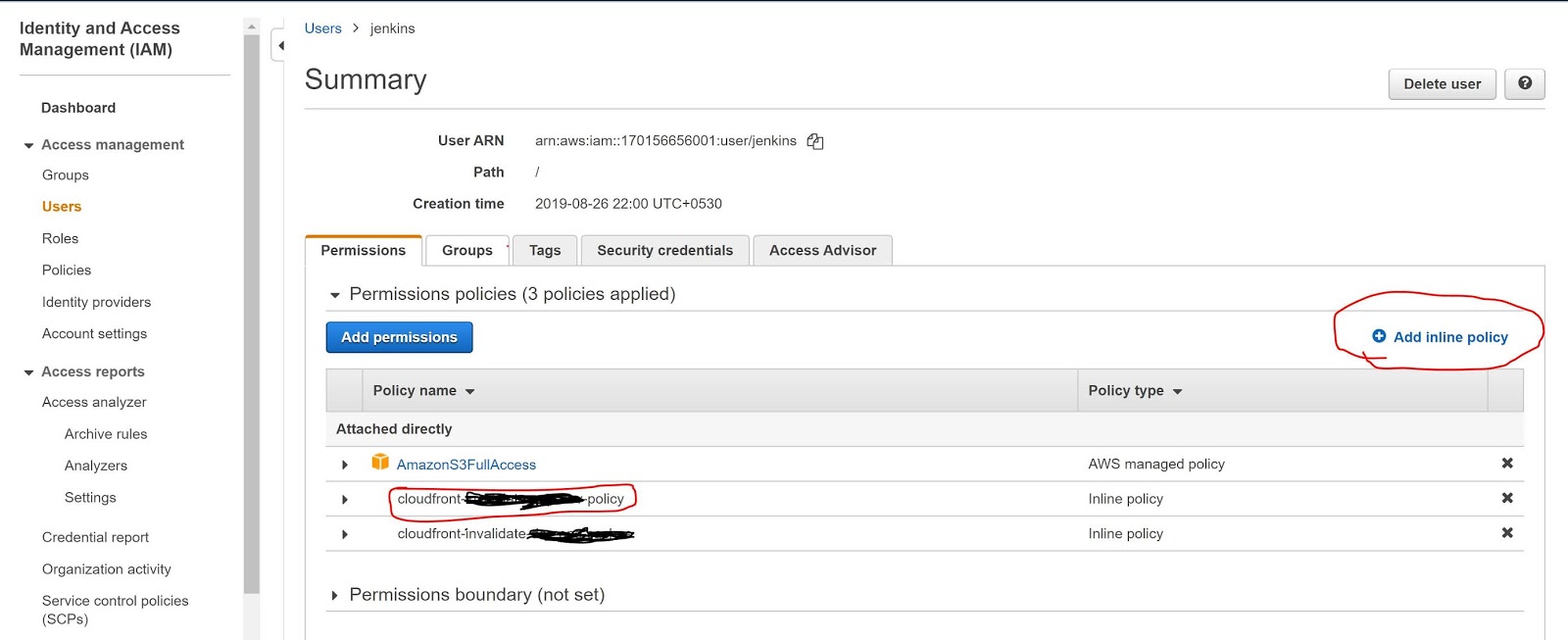


  • Now add the below policy into the JSON policy editor. Below the screenshot.

Policy JSON:-


{
    "Version": "2012-10-17",
    "Statement": [
        {
            "Sid": "VisualEditoro",
            "Effect": "Allow",
            "Action": "cloudfront:CreateInvalidation",
            "Resource": "arn:aws:cloudfront::17088938460999:distribution/UJH89JKKMOVY340"
        }
    ]
}


Sample Screenshot:-


Now, it's working fine. I can see the Jenkins logs below.

Jenkins Success Log:-

; perhaps you meant to use ‘PATH+EXTRA=/something/bin’?
+ aws configure set preview.cloudfront true
[Pipeline] sh
Warning: JENKINS-41339 probably bogus PATH=/var/lib/jenkins/tools/jenkins.plugins.nodejs.tools.NodeJSInstallation/node-v10.16.3-linux-x64/bin:/var/lib/jenkins/tools/hudson.model.JDK/JDK8-152/bin:$PATH:/usr/local/bin:$MAVEN_HOME/bin:/usr/local/bin:/var/lib/jenkins/tools/hudson.tasks.Maven_MavenInstallation/mvn/bin:/usr/sbin:/usr/bin:/sbin:/bin; perhaps you meant to use ‘PATH+EXTRA=/something/bin’?
+ aws cloudfront create-invalidation --distribution-id UJH89JKKMOVY340 --paths '/*'
{
    "Invalidation": {
        "Status": "InProgress", 
        "InvalidationBatch": {
            "Paths": {
                "Items": [
                    "/*"
                ], 
                "Quantity": 1
            }, 
            "CallerReference": "cli-1588239578-85708"
        }, 
        "Id": "I3HILN71CKWOV4", 
        "CreateTime": "2020-04-30T09:39:38.919Z"
    }, 
    "Location": "https://cloudfront.amazonaws.com/2019-03-26/distribution/UJH89JKKMOVY340/invalidation/I3HILN71CKWOV4"
}


Hope this will help you. 

Thursday, June 13, 2019

AWS Lambda AccessDeniedException While Calling getIntents

I am getting the below issue (AccessDeniedException ) while calling getIntents in lambda function with NodeJs. Below screenshot shows my lambda function call.


AccessDeniedException Logs 


2019-06-13T05:11:41.415Z 2b50a8fb-81bc-4f35-b024-d8c4a7864c74 INFO { AccessDeniedException: User: arn:aws:sts::156576774796:assumed-role/fulfilClaimProcessRole/fulfilClaimProcess is not authorized to perform: lex:GetIntents on resource: arn:aws:lex:us-east-1:156576774796:intent:*at Object.extractError (/var/runtime/node_modules/aws-sdk/lib/protocol/json.js:51:27)at Request.extractError (/var/runtime/node_modules/aws-sdk/lib/protocol/rest_json.js:55:8)at Request.callListeners (/var/runtime/node_modules/aws-sdk/lib/sequential_executor.js:106:20)at Request.emit (/var/runtime/node_modules/aws-sdk/lib/sequential_executor.js:78:10)at Request.emit (/var/runtime/node_modules/aws-sdk/lib/request.js:683:14)at Request.transition (/var/runtime/node_modules/aws-sdk/lib/request.js:22:10)at AcceptorStateMachine.runTo (/var/runtime/node_modules/aws-sdk/lib/state_machine.js:14:12)at /var/runtime/node_modules/aws-sdk/lib/state_machine.js:26:10at Request.<anonymous> (/var/runtime/node_modules/aws-sdk/lib/request.js:38:9)at Request.<anonymous> (/var/runtime/node_modules/aws-sdk/lib/request.js:685:12)message:'User: arn:aws:sts::156576774796:assumed-role/fulfilClaimProcessRole/fulfilClaimProcess is not authorized to perform: lex:GetIntents on resource: arn:aws:lex:us-east-1:156576774796:intent:*',code: 'AccessDeniedException',time: 2019-06-13T05:11:41.355Z,requestId: 'baaca585-8d99-11e9-a134-070d28c2c0ab',statusCode: 403,retryable: false,retryDelay: 64.04832064780818 } 'AccessDeniedException: User: arn:aws:sts::156576774796:assumed-role/fulfilClaimProcessRole/fulfilClaimProcess is not authorized to perform: lex:GetIntents on resource: arn:aws:lex:us-east-1:156576774796:intent:*\n at Object.extractError (/var/runtime/node_modules/aws-sdk/lib/protocol/json.js:51:27)\n at Request.extractError (/var/runtime/node_modules/aws-sdk/lib/protocol/rest_json.js:55:8)\n at Request.callListeners (/var/runtime/node_modules/aws-sdk/lib/sequential_executor.js:106:20)\n at Request.emit (/var/runtime/node_modules/aws-sdk/lib/sequential_executor.js:78:10)\n at Request.emit (/var/runtime/node_modules/aws-sdk/lib/request.js:683:14)\n at Request.transition (/var/runtime/node_modules/aws-sdk/lib/request.js:22:10)\n at AcceptorStateMachine.runTo (/var/runtime/node_modules/aws-sdk/lib/state_machine.js:14:12)\n at /var/runtime/node_modules/aws-sdk/lib/state_machine.js:26:10\n at Request.<anonymous> (/var/runtime/node_modules/aws-sdk/lib/request.js:38:9)\n at Request.<anonymous> (/var/runtime/node_modules/aws-sdk/lib/request.js:685:12)'

Solutions :- It seems there is no access/privileges to access that resource. Now , I am going to give "AmazonLexFullAccess" to my lambda function. You need to attach the policy to your lambda function. Follow the below steps to attach the new permission.

  • Goto ->  Security, Identity, & Compliance => IAM (Identity and Access Management) 
  • Select Roles => Select your Lambda function role(Which is you would have created during function creation?) 
  • Now click on Attach policy 
  • Find AmazonLexFullAccess and click on attach.

Once you provide the AmazonLexFullAccess to your lambda function role , you will be able to call your lex:intents call. Its working for me. See the below response I got from the lex:intents call. I got my all intents I have created.


{
    "intents": [
        {
            "name": "AutoLoanDepartment",
            "description": null,
            "lastUpdatedDate": "2019-06-04T10:03:16.995Z",
            "createdDate": "2019-06-04T05:16:50.430Z",
            "version": "$LATEST"
        },
        {
            "name": "BookCar",
            "description": "Intent to book a car on StayBooker",
            "lastUpdatedDate": "2019-06-04T03:23:05.817Z",
            "createdDate": "2019-06-04T03:19:44.041Z",
            "version": "$LATEST"
        },
        {
            "name": "BookHotel",
            "description": "Intent to book a hotel on StayBooker",
            "lastUpdatedDate": "2019-06-04T03:19:43.241Z",
            "createdDate": "2019-06-04T03:19:43.241Z",
            "version": "$LATEST"
        },
        {
            "name": "ClaimDepartment",
            "description": null,
            "lastUpdatedDate": "2019-06-05T10:19:51.705Z",
            "createdDate": "2019-06-05T10:19:51.705Z",
            "version": "$LATEST"
        },
        {
            "name": "ClaimProcess",
            "description": null,
            "lastUpdatedDate": "2019-06-13T04:43:06.699Z",
            "createdDate": "2019-06-06T03:35:33.460Z",
            "version": "$LATEST"
        },
        {
            "name": "GreetingMSG",
            "description": null,
            "lastUpdatedDate": "2019-06-11T08:02:33.055Z",
            "createdDate": "2019-06-06T03:35:06.013Z",
            "version": "$LATEST"
        },
        {
            "name": "LoanDepartment",
            "description": null,
            "lastUpdatedDate": "2019-06-04T05:14:16.304Z",
            "createdDate": "2019-06-04T03:36:52.751Z",
            "version": "$LATEST"
        },
        {
            "name": "PersonalLoanDept",
            "description": null,
            "lastUpdatedDate": "2019-06-04T03:32:46.542Z",
            "createdDate": "2019-06-04T03:32:46.542Z",
            "version": "$LATEST"
        },
        {
            "name": "PolicyProcess",
            "description": null,
            "lastUpdatedDate": "2019-06-06T06:01:46.064Z",
            "createdDate": "2019-06-06T06:01:46.064Z",
            "version": "$LATEST"
        },
        {
            "name": "RenewPolicy",
            "description": null,
            "lastUpdatedDate": "2019-06-07T07:05:13.123Z",
            "createdDate": "2019-06-06T10:29:21.371Z",
            "version": "$LATEST"
        }
    ],
    "nextToken": null
}


Hope this will help you.