Showing posts with label Tomcat. Show all posts

Monday, September 7, 2026

Tomcat 7 Catalina.start LifecycleException – Failed to Start Component

Issue: Catalina.start: org.apache.catalina.LifecycleException: Failed to Start Component

This is an issue I faced with Tomcat 7 while starting the server. Usually, we start the server from the Eclipse server configuration during the development process.

The server was not able to start and was not ready to provide the service. It was trying to run for a few seconds but failed with a Windows alert.

 Console logs :-   


Nov 29, 2014 7:16:46 PM org.apache.catalina.startup.Catalina start
SEVERE: Catalina.start:
org.apache.catalina.LifecycleException: Failed to start component [StandardServer[8005]]
at org.apache.catalina.util.LifecycleBase.start(LifecycleBase.java:154)
at org.apache.catalina.startup.Catalina.start(Catalina.java:675)
at sun.reflect.NativeMethodAccessorImpl.invoke0(Native Method)
at sun.reflect.NativeMethodAccessorImpl.invoke(Unknown Source)
at sun.reflect.DelegatingMethodAccessorImpl.invoke(Unknown Source)
at java.lang.reflect.Method.invoke(Unknown Source)
at org.apache.catalina.startup.Bootstrap.start(Bootstrap.java:322)
at org.apache.catalina.startup.Bootstrap.main(Bootstrap.java:450)
Caused by: org.apache.catalina.LifecycleException: Failed to start component [StandardService[Catalina]]
at org.apache.catalina.util.LifecycleBase.start(LifecycleBase.java:154)
at org.apache.catalina.core.StandardServer.startInternal(StandardServer.java:732)
at org.apache.catalina.util.LifecycleBase.start(LifecycleBase.java:150)
... 7 more
Caused by: org.apache.catalina.LifecycleException: Failed to start component [StandardEngine[Catalina]]
at org.apache.catalina.util.LifecycleBase.start(LifecycleBase.java:154)
at org.apache.catalina.core.StandardService.startInternal(StandardService.java:443)
at org.apache.catalina.util.LifecycleBase.start(LifecycleBase.java:150)
... 9 more
Caused by: org.apache.catalina.LifecycleException: A child container failed during start
at org.apache.catalina.core.ContainerBase.startInternal(ContainerBase.java:1136)
at org.apache.catalina.core.StandardEngine.startInternal(StandardEngine.java:302)
at org.apache.catalina.util.LifecycleBase.start(LifecycleBase.java:150)
... 11 more

Caused By - There may be many reason , but I found mismatching of JRE versions. This is likely a JVM class loader issue. If you have multiple JAR files in the same directory with the same class in them , there is no defined order in which the JAR files will be searched. My installed JVM was version JDK 6 but my tomcat configuration was JDK 7.Check your server runtime configuration on Eclipse for JDK version. 
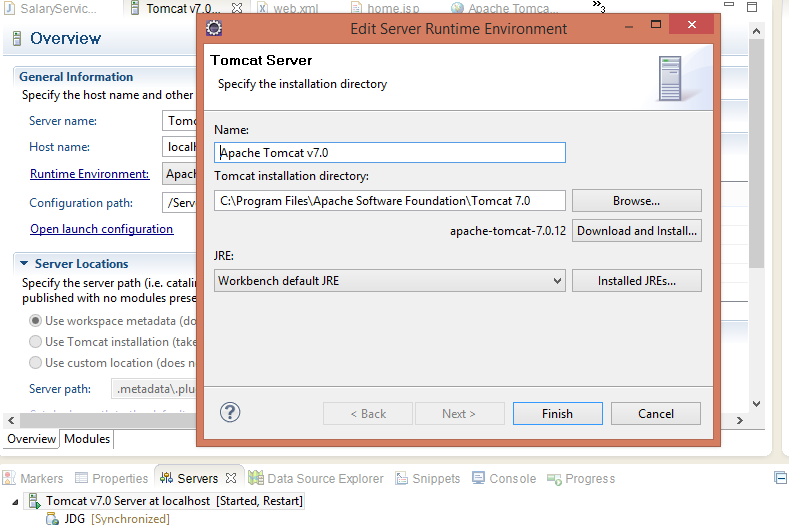


Also I did the cleanup for the server setting in Eclipse.For cleanup , right click on server configuration and click on clean.Now it works for me.


Friday, September 4, 2026

Java/Tomcat: Understanding Out of Memory Error (OOME)

Out of Memory Error (OOME) in Tomcat

What is an Out of Memory Error, and why does it happen?

The basic cause of an OutOfMemoryError (OOME) is that the JVM cannot allocate enough memory for an application to continue running. In a Tomcat environment, this can result in an application failure or, depending on the situation, the Tomcat process being unable to continue.

The error itself is not particularly difficult to understand. The difficult part is finding the actual root cause.

A stack trace may show where the JVM ran out of memory, but it does not always identify why the application consumed so much memory. In many cases, the problem is related to the web application running inside Tomcat rather than Tomcat itself.

The code causing the problem may also look perfectly normal. For example, an application might load a large amount of data into memory, retain objects longer than necessary, or create too many objects during processing. This makes it difficult to identify which part of the application is actually responsible for the problem.

Here are some common causes of an OutOfMemoryError:

  • The JVM heap size is too small for the application's workload.
  • The application loads a very large file or a large amount of data into memory.
  • The application creates a large number of objects or collections.
  • Objects are unintentionally retained for longer than necessary, causing memory usage to grow.
  • Excessive recursion can cause a StackOverflowError rather than a heap OutOfMemoryError, so this should be considered a separate problem.
  • Too many threads can cause memory-related problems, although this may also result in errors such as Unable to create new native thread.
  • Running out of file descriptors is a separate operating-system resource issue and is not itself an OutOfMemoryError.
  • In older Java applications, a large number of web applications or classloaders could contribute to PermGen exhaustion.

Finding the Root Cause

Increasing the JVM heap size can sometimes reduce or temporarily resolve an OutOfMemoryError, but it does not necessarily fix the underlying problem. If the application continues to consume memory, increasing -Xmx only delays the failure.

For this reason, it is important to investigate the application's memory usage using appropriate JVM monitoring or profiling tools and identify which objects or parts of the application are consuming memory.

Note: PermGen applies to older Java versions. Java 8 removed PermGen and replaced it with Metaspace. Therefore, PermGen space errors are relevant mainly when troubleshooting older Java applications.

Error: java.lang.OutOfMemoryError: PermGen space

In J2EE development, this is one of the common and frequent errors that developers may face. Sometimes it can be difficult to identify the actual cause, especially when the application runs out of JVM memory.

PermGen space or heap size (OutOfMemoryError) issues can be addressed by increasing the JVM memory allocated to Tomcat. The following are some approaches that can be used.
 

Solution 1: Set CATALINA_OPTS

Set the `CATALINA_OPTS` environment variable before starting Tomcat.
 

Linux / Unix — ksh / bash

export CATALINA_OPTS="-Xms512m -Xmx512m"

Linux / Unix — tcsh / csh

setenv CATALINA_OPTS "-Xms512m -Xmx512m"

Windows

set CATALINA_OPTS="-Xms512m -Xmx512m"

Stop the Tomcat server, set the `CATALINA_OPTS` environment variable, and then restart Tomcat.

You can check `tomcat-install/bin/catalina.sh` or `catalina.bat` to see how `CATALINA_OPTS` is used.
 

CATALINA_OPTS vs JAVA_OPTS


In `catalina.bat` or `catalina.sh`, you may notice that `CATALINA_OPTS`, `JAVA_OPTS`, or both can be used to specify JVM options.

The difference is that `CATALINA_OPTS` is intended specifically for Tomcat, whereas `JAVA_OPTS` can also be used for other Java applications.

I prefer to use `CATALINA_OPTS` when configuring options specifically for Tomcat, so that Tomcat does not unnecessarily pick up JVM options intended for other applications.
 

Solution 2: Change catalina.bat

Another option is to modify the `catalina.bat` file under the Tomcat `bin` directory.

Open:

tomcat-install/bin/catalina.bat
 

Search for:
 

CATALINA_OPTS, If `CATALINA_OPTS` is not already configured, you can set the required JVM options there.

For older Java versions, an example configuration was:

-Xms256m -Xmx512m -XX:MaxPermSize=256m

If this does not work, check the command used to start Java near the end of the `catalina.bat` file. Look for a line containing `%_EXECJAVA%` and `%JAVA_OPTS%`.

The JVM options can be added to that command. For example:


%_EXECJAVA% %JAVA_OPTS% -Xms256m -Xmx512m -XX:MaxPermSize=256m %DEBUG_OPTS% -Djava.endorsed.dirs="%JAVA_ENDORSED_DIRS%" -classpath "%CLASSPATH%" -Dcatalina.base="%CATALINA_BASE%" -Dcatalina.home="%CATALINA_HOME%" -Djava.io.tmpdir="%CATALINA_TMPDIR%" %MAINCLASS% %CMD_LINE_ARGS% %ACTION%

In this example, `CATALINA_OPTS` has been removed from the command to avoid specifying the same JVM parameters more than once.
 

Important Note About MaxPermSize

`-XX:MaxPermSize` applies to older Java versions that used the PermGen memory area. Java 8 removed PermGen and replaced it with Metaspace.

Therefore, for Java 8 and later, do not use:

-XX:MaxPermSize=256m

For modern Java versions, the relevant options are typically `-Xms` and `-Xmx` for heap size, and `-XX:MaxMetaspaceSize` can be used when there is a specific need to limit Metaspace.

The exact JVM options should depend on the Java version being used by Tomcat.

Java: Fixing JVM Heap Size Errors in Eclipse and MyEclipse

I have used this setting in my IDE. I got this type of error when my team was working on a social-network-type project using the Struts framework. I was really in trouble and was looking for a solution. Finally, I found the solution, and it helped me. I hope it helps you too.

Follow these simple steps to change the Heap Size of Tomcat in Eclipse.

  1. Open the Servers tab in Eclipse and double-click the Tomcat server to open the Server Configuration.


2. In Server Configuration, click on the Launch Configuration link under General Information.
3. Under Arguments tab, add following values in VM arguments.
1
-Xms64m -Xmx256m

Monday, September 21, 2015

Tomcat WAR Deployment: Properties File Not Found

This issue I faced while loading the war file on Tomcat. This may be a minor issue, but I faced this issue and spend some time to fix this issue.


Actually , I was working on Tomcat newly and I was not sure what configuration we need to load the properties file. Normally all the properties files are placed in class path.

I placed the properties file inside the Tomcat , but I don't know why this issue was coming.

Issue log :-


25/08/2015 1:58:08 PM org.apache.catalina.core.StandardContext loadOnStartup
SEVERE: Servlet /customer_service_gateway-1.0.2-SNAPSHOT threw load() exception
java.io.FileNotFoundException: class path resource [customer_service_gateway/customer.properties] cannot be opened because it does not exist
    at org.springframework.core.io.ClassPathResource.getInputStream(ClassPathResource.java:157)
    at org.springframework.core.io.support.EncodedResource.getInputStream(EncodedResource.java:143)
    at org.springframework.core.io.support.PropertiesLoaderUtils.fillProperties(PropertiesLoaderUtils.java:98)
    at org.springframework.core.io.support.PropertiesLoaderSupport.loadProperties(PropertiesLoaderSupport.java:175)
    at org.springframework.core.io.support.PropertiesLoaderSupport.mergeProperties(PropertiesLoaderSupport.java:156)
    at org.springframework.beans.factory.config.PropertiesFactoryBean.createInstance(PropertiesFactoryBean.java:113)
    at org.springframework.beans.factory.config.PropertiesFactoryBean.createProperties(PropertiesFactoryBean.java:98)
    at org.springframework.beans.factory.config.PropertiesFactoryBean.afterPropertiesSet(PropertiesFactoryBean.java:69)
    at org.springframework.beans.factory.support.AbstractAutowireCapableBeanFactory.invokeInitMethods(AbstractAutowireCapableBeanFactory.java:1541)
    at org.springframework.beans.factory.support.AbstractAutowireCapableBeanFactory.initializeBean(AbstractAutowireCapableBeanFactory.java:1479)
    at org.springframework.beans.factory.support.AbstractAutowireCapableBeanFactory.doCreateBean(AbstractAutowireCapableBeanFactory.java:521)
    at org.springframework.beans.factory.support.AbstractAutowireCapableBeanFactory.createBean(AbstractAutowireCapableBeanFactory.java:458)
    at org.springframework.beans.factory.support.AbstractBeanFactory$1.getObject(AbstractBeanFactory.java:295)
    at org.springframework.beans.factory.support.DefaultSingletonBeanRegistry.getSingleton(DefaultSingletonBeanRegistry.java:223)
    at org.springframework.beans.factory.support.AbstractBeanFactory.doGetBean(AbstractBeanFactory.java:292)
    at org.springframework.beans.factory.support.AbstractBeanFactory.getBean(AbstractBeanFactory.java:194)
    at org.springframework.beans.factory.support.BeanDefinitionValueResolver.resolveReference(BeanDefinitionValueResolver.java:323)
    at org.springframework.beans.factory.support.BeanDefinitionValueResolver.resolveValueIfNecessary(BeanDefinitionValueResolver.java:107)
    at org.springframework.beans.factory.support.AbstractAutowireCapableBeanFactory.applyPropertyValues(AbstractAutowireCapableBeanFactory.java:1387)
    at org.springframework.beans.factory.support.AbstractAutowireCapableBeanFactory.populateBean(AbstractAutowireCapableBeanFactory.java:1128)
    at org.springframework.beans.factory.support.AbstractAutowireCapableBeanFactory.doCreateBean(AbstractAutowireCapableBeanFactory.java:519)
    at org.springframework.beans.factory.support.AbstractAutowireCapableBeanFactory.createBean(AbstractAutowireCapableBeanFactory.java:458)
    at org.springframework.beans.factory.support.AbstractBeanFactory$1.getObject(AbstractBeanFactory.java:295)
    at org.springframework.beans.factory.support.DefaultSingletonBeanRegistry.getSingleton(DefaultSingletonBeanRegistry.java:223)
    at org.springframework.beans.factory.support.AbstractBeanFactory.doGetBean(AbstractBeanFactory.java:292)
    at org.springframework.beans.factory.support.AbstractBeanFactory.getBean(AbstractBeanFactory.java:198)
    at org.springframework.context.support.AbstractApplicationContext.invokeBeanFactoryPostProcessors(AbstractApplicationContext.java:657)
    at org.springframework.context.support.AbstractApplicationContext.refresh(AbstractApplicationContext.java:461)
    at org.springframework.web.servlet.FrameworkServlet.configureAndRefreshWebApplicationContext(FrameworkServlet.java:651)
    at org.springframework.web.servlet.FrameworkServlet.createWebApplicationContext(FrameworkServlet.java:599)
    at org.springframework.web.servlet.FrameworkServlet.createWebApplicationContext(FrameworkServlet.java:665)
    at org.springframework.web.servlet.FrameworkServlet.initWebApplicationContext(FrameworkServlet.java:518)
    at org.springframework.web.servlet.FrameworkServlet.initServletBean(FrameworkServlet.java:459)
    at org.springframework.web.servlet.HttpServletBean.init(HttpServletBean.java:136)
    at javax.servlet.GenericServlet.init(GenericServlet.java:160)
    at org.apache.catalina.core.StandardWrapper.initServlet(StandardWrapper.java:1280)
    at org.apache.catalina.core.StandardWrapper.loadServlet(StandardWrapper.java:1193)
    at org.apache.catalina.core.StandardWrapper.load(StandardWrapper.java:1088)
    at org.apache.catalina.core.StandardContext.loadOnStartup(StandardContext.java:5123)
    at org.apache.catalina.core.StandardContext.startInternal(StandardContext.java:5407)
    at org.apache.catalina.util.LifecycleBase.start(LifecycleBase.java:150)
    at org.apache.catalina.core.ContainerBase.addChildInternal(ContainerBase.java:901)
    at org.apache.catalina.core.ContainerBase.addChild(ContainerBase.java:877)
    at org.apache.catalina.core.StandardHost.addChild(StandardHost.java:633)
    at org.apache.catalina.startup.HostConfig.deployWAR(HostConfig.java:976)
    at org.apache.catalina.startup.HostConfig$DeployWar.run(HostConfig.java:1653)
    at java.util.concurrent.Executors$RunnableAdapter.call(Executors.java:439)
    at java.util.concurrent.FutureTask$Sync.innerRun(FutureTask.java:303)
    at java.util.concurrent.FutureTask.run(FutureTask.java:138)
    at java.util.concurrent.ThreadPoolExecutor$Worker.runTask(ThreadPoolExecutor.java:895)
    at java.util.concurrent.ThreadPoolExecutor$Worker.run(ThreadPoolExecutor.java:918)
    at java.lang.Thread.run(Thread.java:662)

The issue was , tomcat loader was not able to locate the file . So , you need to configure this manually. 

Finally , I fixed this by configure the properties directory in tomcat. You need to explicitly mention the properties location from where your tomcat can read the library and other properties. But, its not always advisable .
You can add the <Tomcat Home Directory> into catalina.properties file. 

Example :-
 shared.loader=/usr/java/apache-tomcat-7.0.41
Note :- Catalina.properties file is inside <Tomcat Home Directory> /conf